# Cody Enterprise features
Along with the core features, Cody Enterprise offers additional features to
enhance your coding experience.
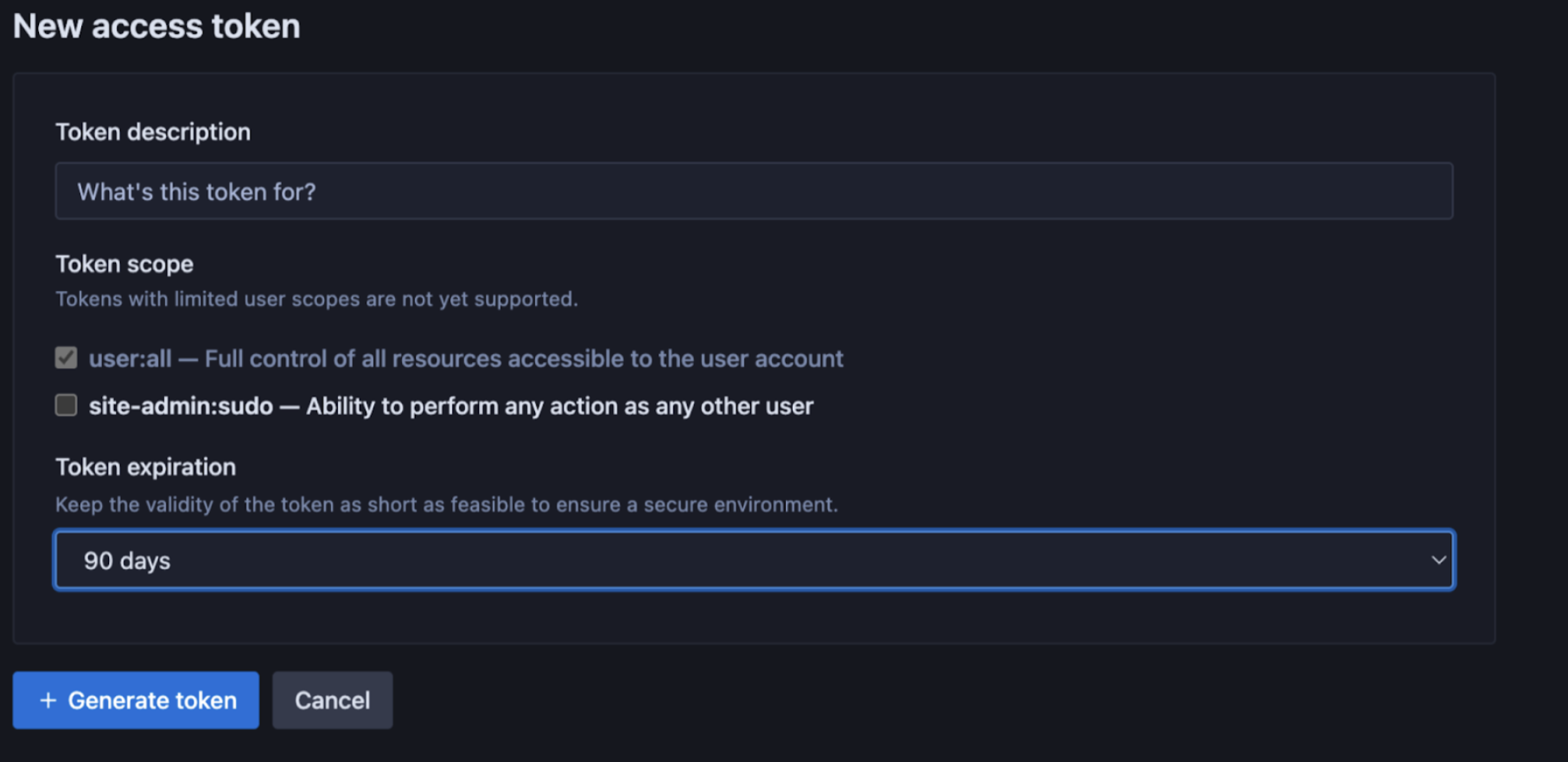
## IDE token expiry
Site administrators can set the duration of access tokens for users connecting Cody from their IDEs (VS Code, JetBrains, etc.). This can be configured from the **Site admin** page of the Sourcegraph Enterprise instance. Available options include **7, 14, 30, 60, and 90 days**.
## Guardrails
Guardrails has been deprecated and is no longer recommended for use.
Guardrails for public code is only supported on VS Code, JetBrains IDEs
extension, and Sourcegraph Web app for Cody Enterprise customers using
[Sourcegraph Model Provider (Cody Gateway)](/model-provider). It is not
supported for any BYOK (Bring Your Own Key) deployments.{' '}
Open source attribution guardrails for public code, commonly called copyright guardrails, reduce the exposure to copyrighted code. This involves implementing a verification mechanism within Cody to ensure that any code generated by the platform does not replicate open source code.
Guardrails for public code are available to all Sourcegraph Enterprise instances and are **disabled** by default. You can enable them from the Site configuration section by setting `attribution.enabled` to `true`.
Guardrails don't differentiate between license types. It matches any code snippet that is at least **ten lines** long from the **290,000** indexed open source repositories.
### Guardrails `enforced` check
You can `enforce` a Guardrails check to prevent any matching code from being shown to the user. To do so, site admins need to add `"attribution.mode": "enforced"` in the **Site configuration** setting. This will configure the settings for Cody IDE extensions VS Code (v1.82+) or JetBrains (v7.82+) accordingly and will enforce not to display code until attribution checks have finished.
### Known Limitations
1. Guardrails work through an exact string match across ten or more lines, which means extra comments or name changes may not trigger the check
2. The strings are compared against around **290,000** indexed open source repositories, consisting of all license types, including permissive and non-permissive licenses
3. Guardrails requires access to the Cody Gateway, which means it's not supported for any customers using BYOK (Bring Your Own Key)
4. Guardrails is only supported on the Sourcegraph Web app, and the IDE extensions in VS Code, JetBrains IDEs, for chat and autocomplete
## Admin controls
Admin controls are supported with VS Code and JetBrains IDE extension.
Site administrators have selective control over users' access to Cody Enterprise, which is managed via the Sourcegraph role-based access control system. This provides a more intuitive user interface for assigning permission to use Cody.
## Analytics
Cody Analytics are supported with VS Code IDE extension and on the latest
versions of JetBrains IDEs.
Cody Enterprise users can view analytics for their instance. A separately managed cloud service for Cody analytics handles user auth, gets metrics data from Sourcegraph's BigQuery instance, and visualizes the metrics data.
The following metrics are available for Cody Enterprise users:
| **Metric Type** | **What is measured?** |
| --------------- | ---------------------------------------------------------------------------------------------------------------------------------------------------------------------------------------------------------------------------------------------------------------------------------------------------------- |
| Active users | - Total active users
- Average daily users
- Average no. of days each user used Cody (of last 30 days)
- Cody users by day (last 30 days)
- Cody users by month (last two months)
- Cody users by number of days used |
| Completions | - Total accepted completions
- Minutes saved per completion
- Hours saved by completions
- Cody completions by day
- Completions acceptance rate
- Weighted completions acceptance rate
- Average completion latency
- Acceptance rate by language
|
| Chat | - Total chat events
- Minutes saved per chat
- Hours saved by chats
- Cody chats by day |
| Commands | - Total command events
- Minutes saved per command
- Hours saved by commands
- Cody commands by day
- Most used commands |
To enable Cody Analytics:
- Create an account on [Sourcegraph Accounts](https://accounts.sourcegraph.com/)
- A user already having a Sourcegraph.com account gets automatically migrated to Sourcegraph Accounts. Users can sign in to Cody Analytics using their email and password
- Users without a Sourcegraph.com account should contact one of our team members. They can help with both the account setup and assigning instances to specific users
- Map your user account to a Sourcegraph instance, and this gives you access to Cody analytics
## Multi-repository context
Cody supports multi-repository context, allowing you to search up to 10 repositories simultaneously for relevant information. Open a new chat, type `@`, and select `Remote Repositories.`
Keep @-mentioning repos that you want to include in your context. This flexibility lets you get more comprehensive and accurate responses by leveraging information across multiple codebases.
## @-mention context
Users can `@-mention` repositories, files, symbols, and web URLs to better support Enterprise teams working with large codebases when chatting with Cody. This helps you define more specific context.
To do this, type `@` in the chat, and then select the context of your choice.

If you want to include recent changes that haven't been indexed in your Sourcegraph instance, you can `@-mention` specific files, lines of code, or symbols.
## Prompt pre-instructions
**Site admins** can add and configure prompt pre-instructions for Cody. These are text instructions that Cody uses with every chat query, allowing organizations to configure how Cody responds to their users.
For example, if you don’t want Cody to answer questions relating to sensitive non-code matters, you can pre-instruct Cody about it. In this case, if a user asks an unrelated question, Cody responds with a pre-instructed context.
To configure pre-instructions, add the following to your site admin configuration file:
```json
{ ... "modelConfiguration": { "systemPreInstruction": "If the question is not directly related to software development, respond with \"I can only answer programming-related questions\"" } }
```
We cannot guarantee that these pre-instructions or their intended use case
will be fully accurate. If your pre-instructions are not working as
expected, please get in touch with us.
## Supported LLM models
Sourcegraph Enterprise supports different LLM providers and models, such as models from Anthropic and OpenAI. You can do this by adjusting your Sourcegraph instance configuration.
For the supported LLM models listed above, refer to the following notes:
1. Microsoft Azure is planning to deprecate the APIs used in Sourcegraph version `>5.3.3` on July 1, 2024 [Source](https://learn.microsoft.com/en-us/azure/ai-services/openai/api-version-deprecation)
2. Claude 2.1 is not recommended
3. Sourcegraph doesn’t recommend using the GPT-4 (non-Turbo), Claude 1, or Claude 2 models anymore
4. Only supported through legacy completions API
5. BYOK (Bring Your Own Key) with managed services are only supported for Self-hosted Sourcegraph instances
6. GPT-4 and GPT-4o for completions have a bug that is resulting in many failed completions