# Auto-indexing
Supported on [Enterprise](/pricing/plans/enterprise) plans.
Currently in Beta and available via Web app.
Learn and understand how auto-indexing works.
With Sourcegraph deployments supporting [executors](/admin/executors/), your repository contents can be automatically analyzed to produce a code graph index file. Once [auto-indexing is enabled](/code-navigation/auto-indexing#enable-auto-indexing) and [auto-indexing policies are configured](/code-navigation/auto-indexing#configure-auto-indexing), repositories will be periodically cloned into an executor sandbox, analyzed, and the resulting index file will be uploaded back to the Sourcegraph instance.
Auto-indexing is currently available for Go, TypeScript, JavaScript, Python, Ruby and JVM repositories. See also [dependency navigation](/code-navigation/features#dependency-navigation) for instructions on how to setup cross-dependency navigation depending on what language ecosystem you use.
## Enable auto-indexing
The following docs explains how to turn on [auto-indexing](/code-navigation/auto-indexing) on your Sourcegraph instance to enable [precise code navigation](/code-navigation/precise-code-navigation).
### Deploy executors
This step is only required if you are on self-hosted Sourcegraph.
First, [deploy the executor service](/self-hosted/executors/deploy-executors) targeting your Sourcegraph instance. This will provide the necessary compute resources that clone the target Git repository, securely analyze the code to produce a code graph data index, then upload that index to your Sourcegraph instance for processing.
### Enable index job scheduling
Next, enable the following feature flag in your Sourcegraph instance's site configuration.
```yaml
{'codeIntelAutoIndexing.enabled': true}
```
This step will control the scheduling of indexing jobs which are made available to the executors deployed in the previous step.
### Tune the index scheduler
The frequency of index job scheduling can be tuned via the following environment variables read by `worker` service containers running the [`codeintel-auto-indexing`](/self-hosted/workers#codeintel-auto-indexing) task.
- **`PRECISE_CODE_INTEL_AUTO_INDEXING_TASK_INTERVAL`**: The time to run periodic codeintel auto-indexing tasks. The default is every 2 minutes
- **`PRECISE_CODE_INTEL_AUTO_INDEXING_REPOSITORY_PROCESS_DELAY`**: The minimum time that the same repository can be considered for auto-index scheduling. The default is every 24 hours
- **`PRECISE_CODE_INTEL_AUTO_INDEXING_REPOSITORY_BATCH_SIZE`**: The number of repositories to consider for auto-indexing scheduling at a time. Default is 2500
- **`PRECISE_CODE_INTEL_AUTO_INDEX_MAXIMUM_REPOSITORIES_INSPECTED_PER_SECOND`**: The maximum number of repositories inspected for auto-indexing per second. Set to zero to disable the limit. Default is 0
## Configure auto-indexing
This feature is in beta for self-hosted customers.
Precise code navigation [auto-indexing](/code-navigation/auto-indexing) jobs are scheduled based on two fronts of configuration.
The first front selects the set of repositories and commits within those repositories that are candidates for auto-indexing. These candidates are controlled by [configuring auto-indexing policies](#configure-auto-indexing-policies).
The second front determines the set of index jobs that can run over candidate commits. By default, index jobs are [inferred](/code-navigation/inference-configuration) from the repository structure's on disk. Index job inference uses heuristics such as the presence or contents of particular files to determine the paths and commands required to index a repository.
Alternatively, index job configuration [can be supplied explicitly](#explicit-index-job-configuration) for a repository when the inference heuristics are not powerful enough to create an index job that produces the correct results. This might be necessary for projects that have non-standard or complex dependency resolution or pre-compilation steps, for example.
### Configure auto-indexing policies
Let's learn how to configure policies to control the scheduling of precise code navigation indexing jobs. An indexing jobs [produces a code graph data index](/code-navigation/precise-code-navigation) and uploads it to your Sourcegraph instance for use with code navigation.
See the [best practices
guide](/code-navigation/how-to/policies-resource-usage-best-practices) for
additional details on how policies affect resource usage.
Each policy has a number of configurable options, including:
- The set of Git branches or tags to which the policy applies
- The maximum age of commits that should be indexed (e.g., skip indexing commits made last year)
- For branches, whether to only consider the _tip_ of the branch, or all commits on that branch
When auto-indexing is enabled, uploading a code graph data index will trigger creation of index jobs for dependencies if they are available on the Sourcegraph instance, in order to provide greater coverage for precise code navigation actions such as Go to definition and Find references.
Precise code navigation indexing jobs are scheduled periodically in the background for each repository matching an indexing policy.
### Applying indexing policies globally
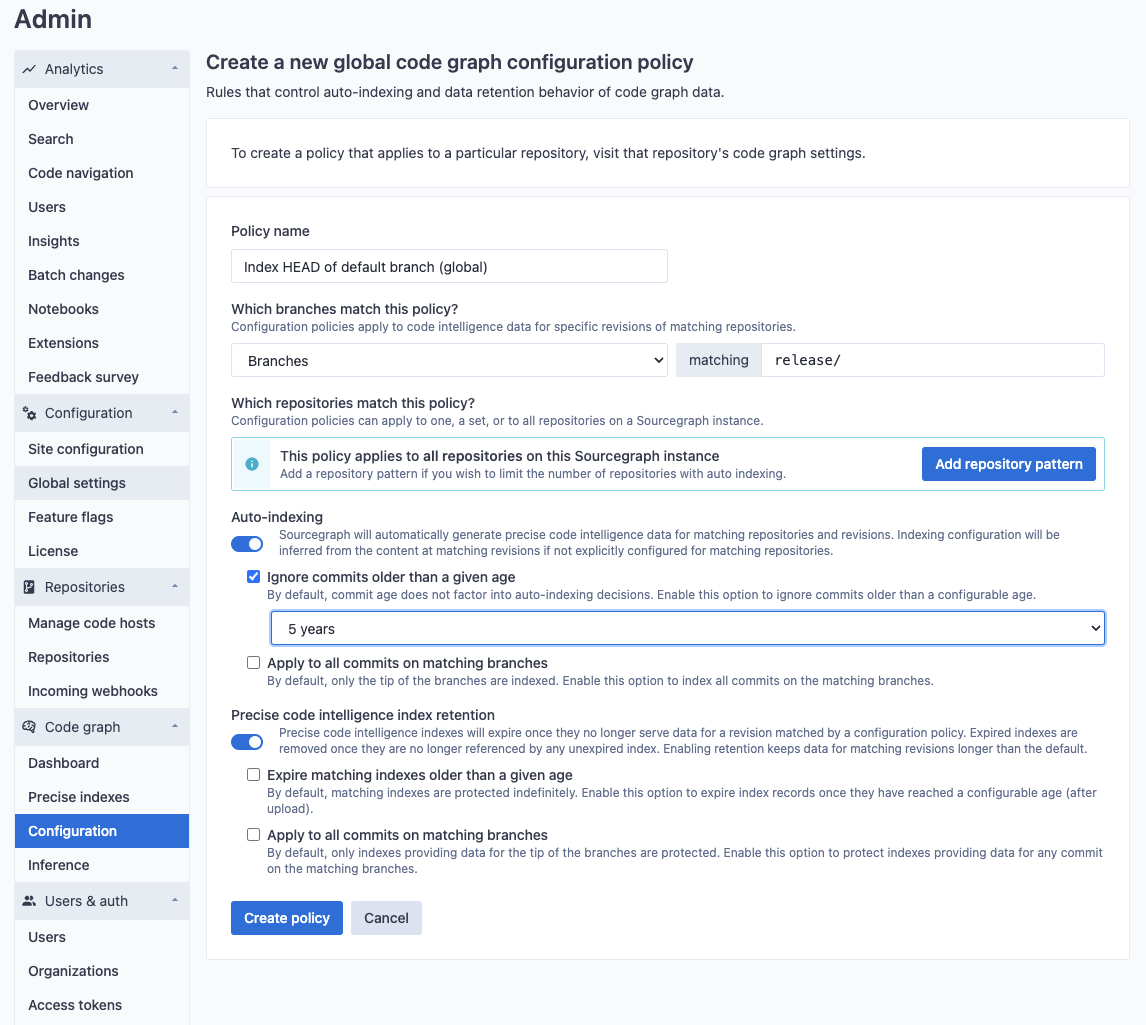
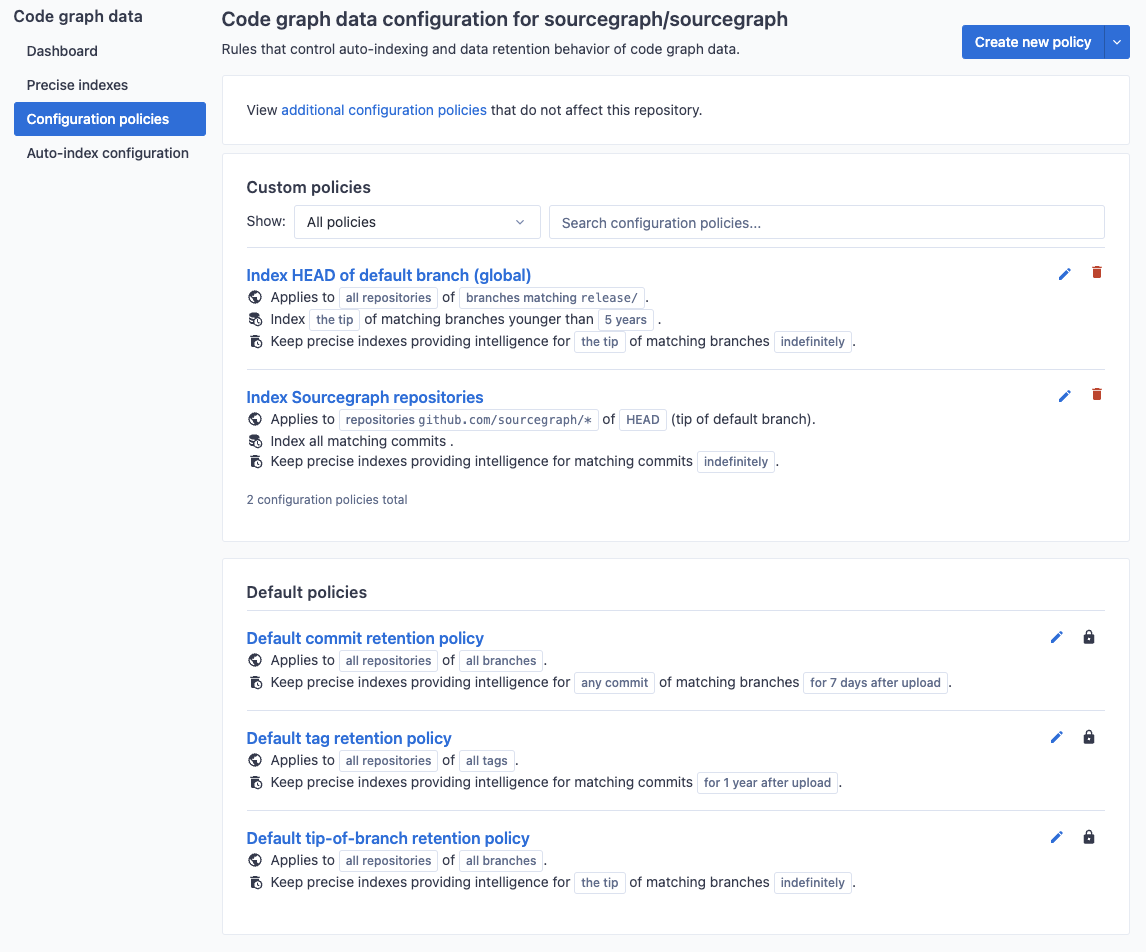
Site admins can create indexing policies that apply to **all repositories** on their Sourcegraph instance. In order to view and edit these policies, navigate to the code graph configuration in the site-admin dashboard.

New policies can also be created to apply to the HEAD of the default branch, or to apply to any arbitrary Git branch or tag pattern. For example, you may want to index release branches for all of your repositories (in this example, branches whose last commit is older than five years of age will not apply).

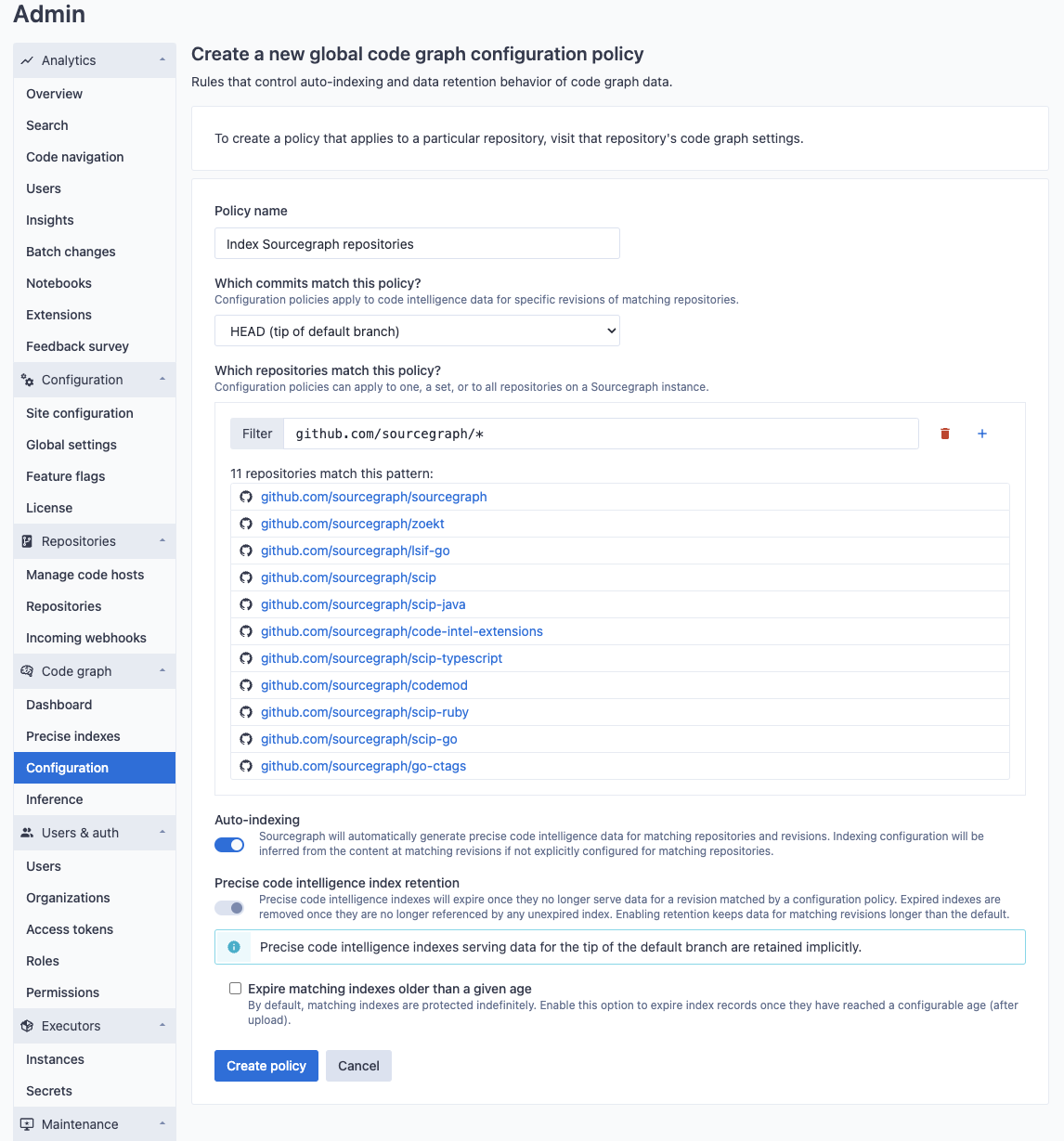
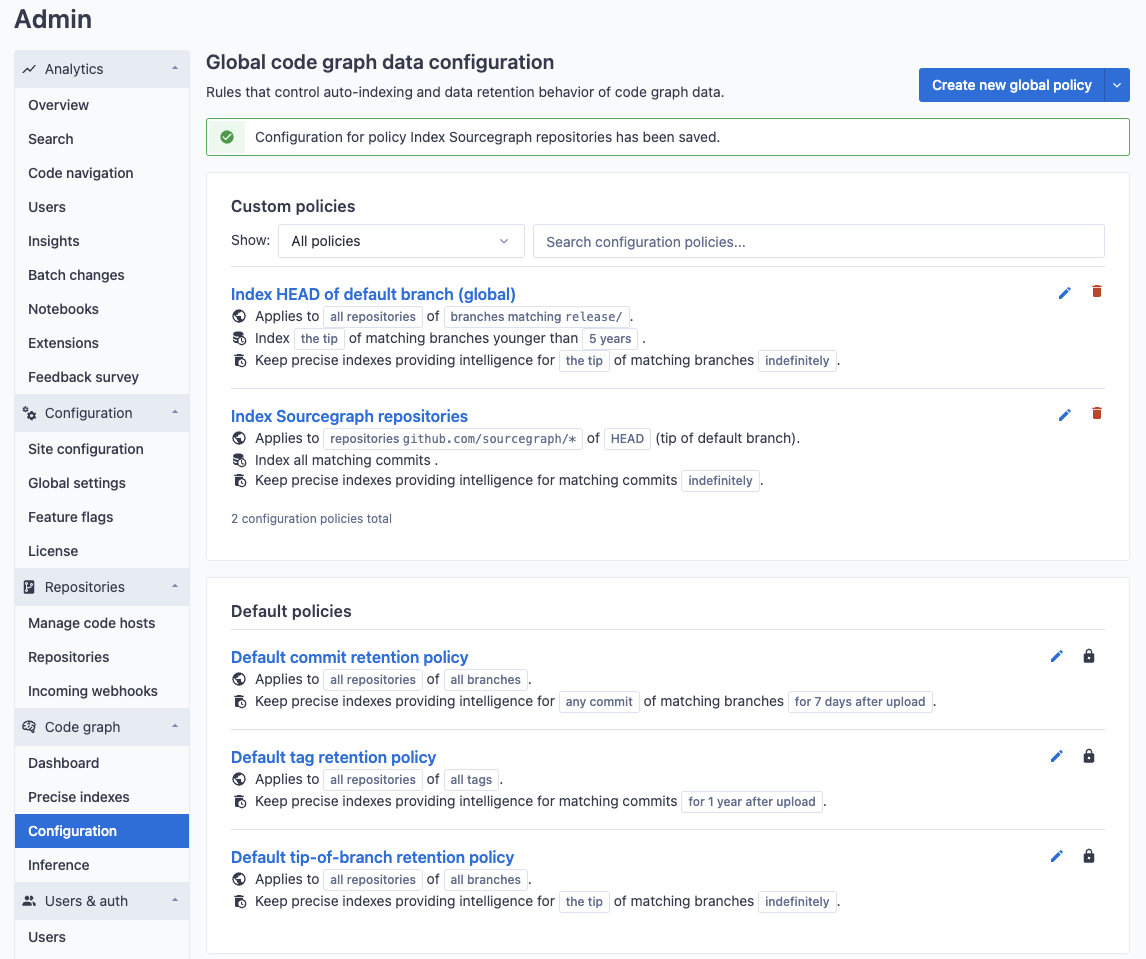
New policies can be created to apply to a set of repositories that are matched by name. For example, you may want to enable indexing for a particular set of repositories (in this example, repositories in the `sourcegraph` organization).
### Applying indexing policies to a specific repository
Indexing policies can also be created on a per-repository basis as commit and merge workflows differ wildly from project to project. In order to view and edit repository-specific policies, navigate to the code graph settings in the target repository's index page.
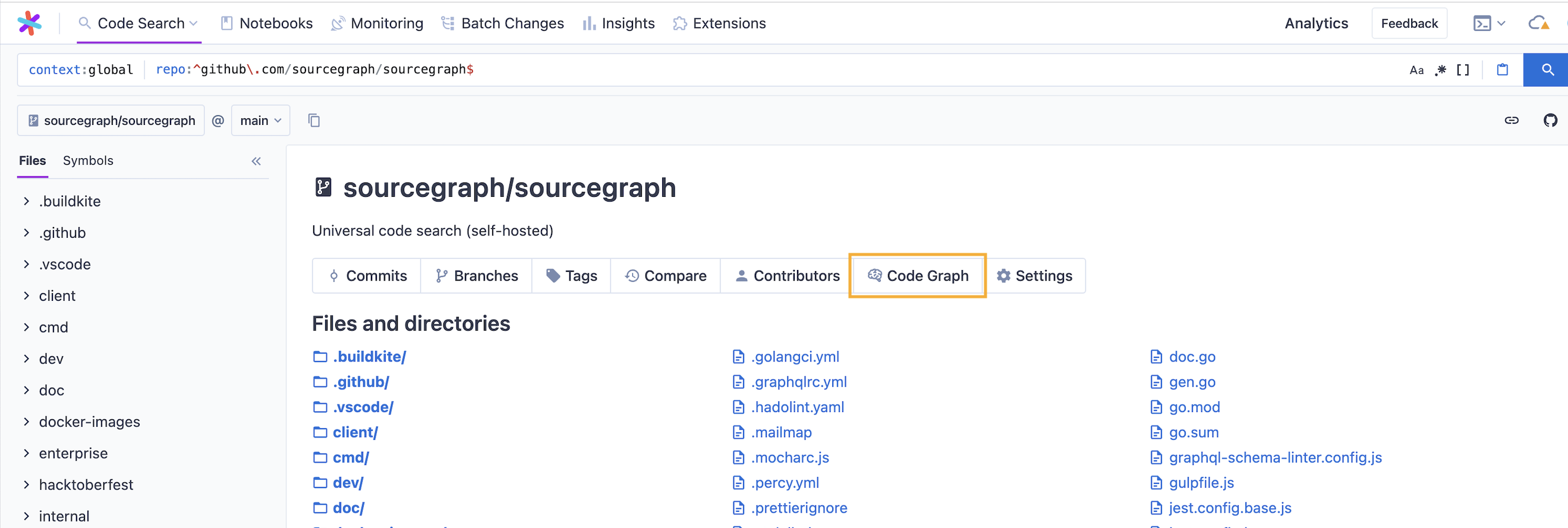
The settings page will show all policies that apply to the given repository, including both repository-specific policies as well as global policies that match the repository.
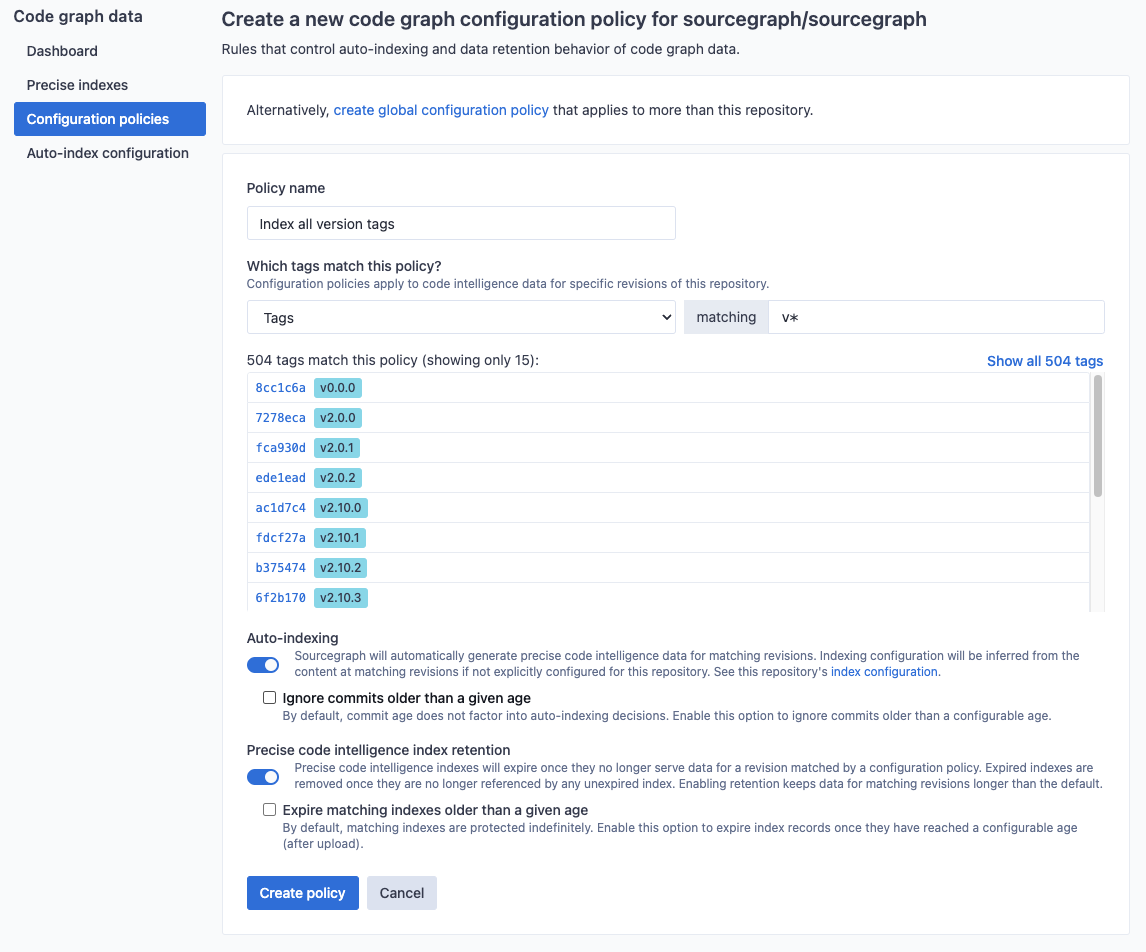
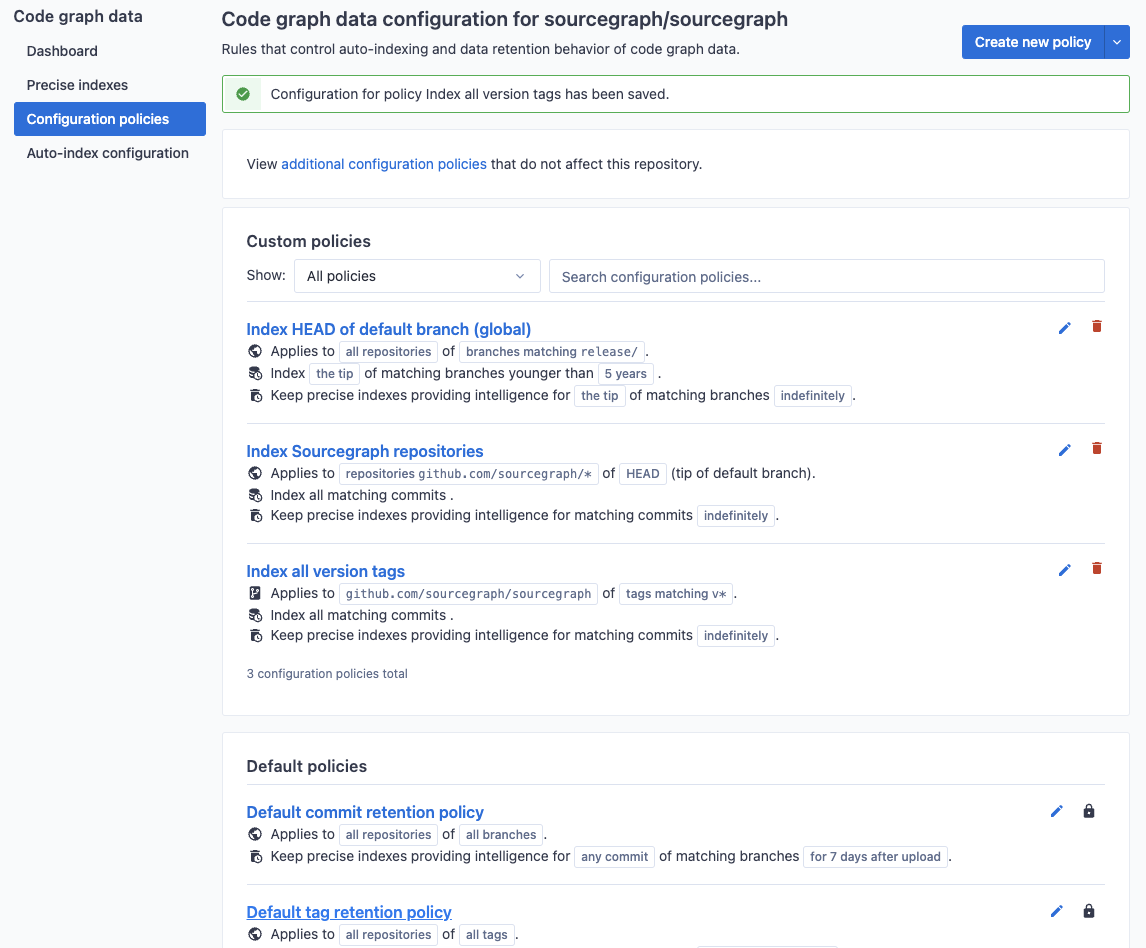
In this example, we create an indexing policy that applies to all _versioned_ tags (those prefixed with `v`). The **Index all version tags** policy ensures all commits visible from matching tagged commit will be kept indexed (and not removed due to age).
### Explicit index job configuration
For projects that have non-standard or complex dependency resolution or pre-compilation steps, inference heuristics might not be powerful enough to create an index job that produces the correct results. In these cases, explicit index job configuration can be supplied to a repository in two ways (listed below in order of decreasing precedence). Both methods of configuration share a common expected schema. See the [reference documentation](/code-navigation/auto-indexing-configuration) for additional information on the shape and content of the configuration.
1. Configure index jobs by committing a `sourcegraph.yaml` file to the root of the target repository. If you're new to YAML and want a short introduction, see [Learn YAML in five minutes](https://learnxinyminutes.com/docs/yaml/). Note that YAML is a strict superset of JSON, therefore the file contents can also be encoded as valid JSON (despite the file extension).
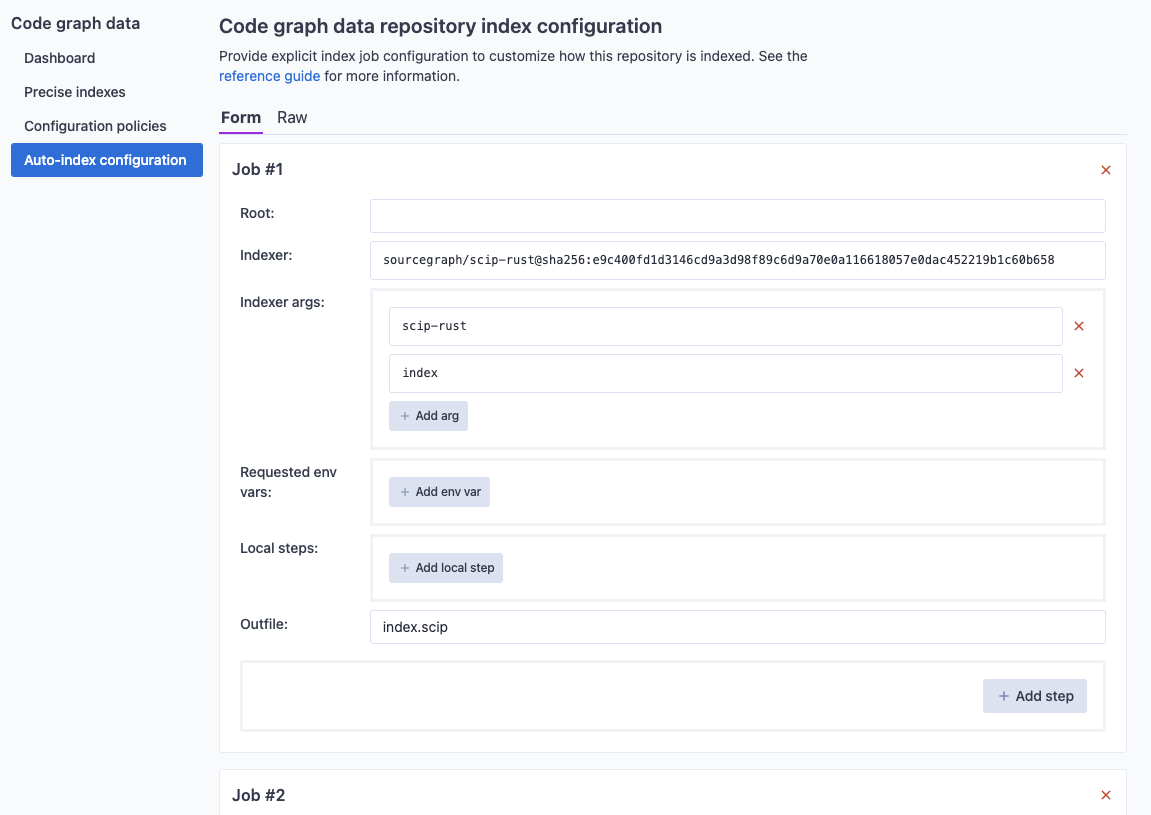
2. Configure index jobs via the target repository's code graph settings UI. In order to view and edit the indexing configuration for a repository, navigate to the code graph settings in the target repository's index page.

From there you can view or edit the repository's configuration. We use a superset of JSON that allows for comments and trailing commas. The set of index jobs that would be [inferred](/code-navigation/explanations/auto-indexing-inference) from the content of the repository (at the current tip of the default branch) can be viewed and may often be useful as a starting point to define more elaborate indexing jobs.
### Private repositories and packages configuration
For auto-indexing jobs to be able to build your projects that use private repositories and packages, you need to provide language-specific configuration in the form of Executor secrets.
### Go
For Go resolver to access private Git repositories, you need to configure a `NETRC_DATA` secret with the following contents:
```text
machine login password
```
Under the hood, this information will be used to write the [.netrc](https://www.gnu.org/software/inetutils/manual/html_node/The-_002enetrc-file.html) file that is respected by Git and Go.
### TypeScript/JavaScript
For **NPM**, you can create a [secret named `NPM_TOKEN`](https://docs.npmjs.com/using-private-packages-in-a-ci-cd-workflow#set-the-token-as-an-environment-variable-on-the-cicd-server) which will be automatically picked up by the indexer.
## Language support
Auto-indexing is currently available for Go, TypeScript, JavaScript, Python, Ruby and JVM repositories. See also [dependency navigation](/code-navigation/features#dependency-navigation) for instructions on how to setup cross-dependency navigation depending on what language ecosystem you use.
## Lifecycle of an indexing job
Index jobs are run asynchronously from a queue. Each index job has an attached **state** that can change over time as work associated with that job is performed. The following diagram shows transition paths from one possible state of an index job to another.

The general happy-path for an index job is: `QUEUED_FOR_INDEXING`, `INDEXING`, then `INDEXING_COMPLETED`. Once uploaded, the remaining lifecycle is described in [lifecycle of an upload](/code-navigation/explanations/uploads#lifecycle-of-an-upload).
Index jobs may fail to complete due to the job configuration not aligning with the repository contents or due to transient errors related to the network (for example). An index job will enter the `INDEXING_ERRORED` state on such conditions. Errored index jobs may be retried a number of times before moving into a permanently errored state.
At any point, an index job record may be deleted (usually due to explicit deletion by the user).
## Lifecycle of an indexing job (via UI)
Users can see precise code navigation index jobs for a particular, repository by navigating to the code graph page in the target repository's index page.

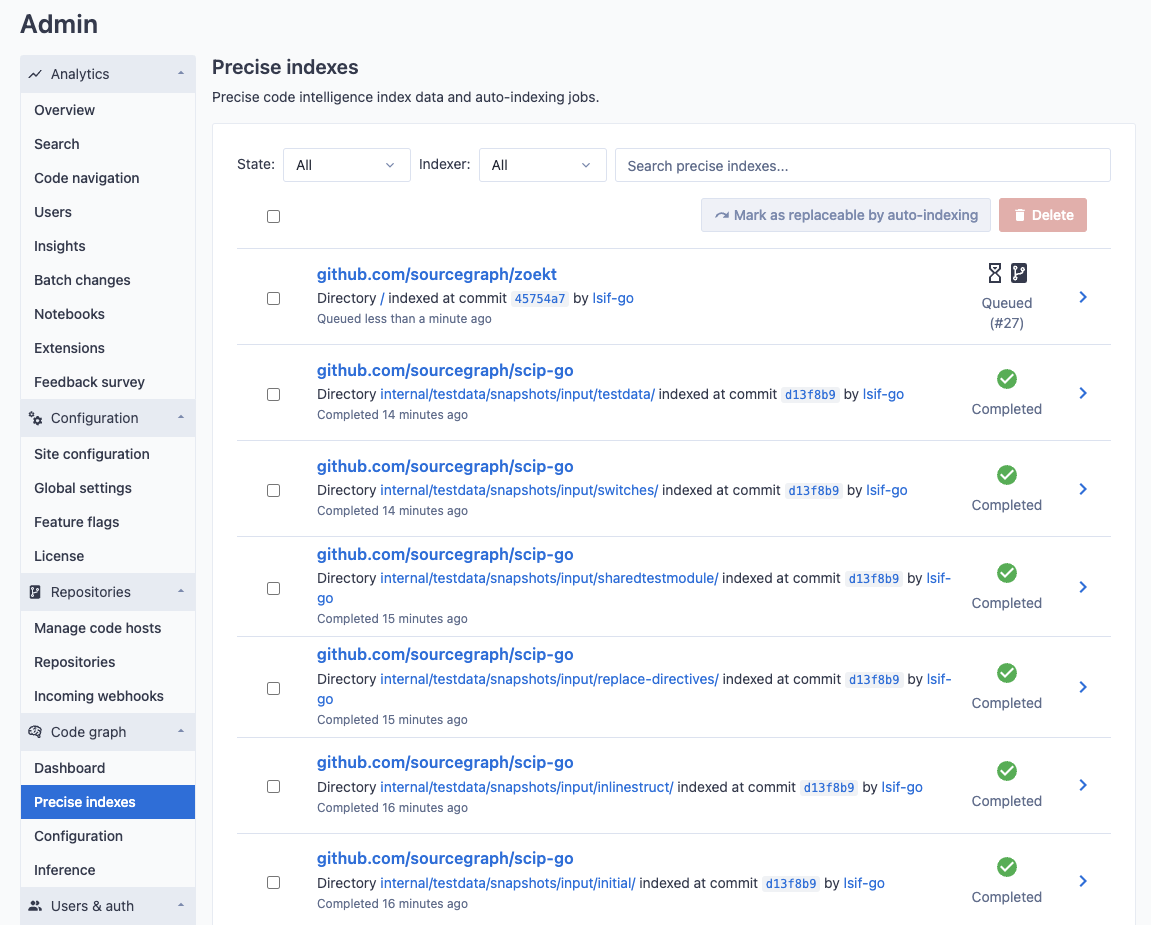
Administrators of a Sourcegraph instance can see a global view of code graph index jobs across all repositories from the **Site Admin** page.
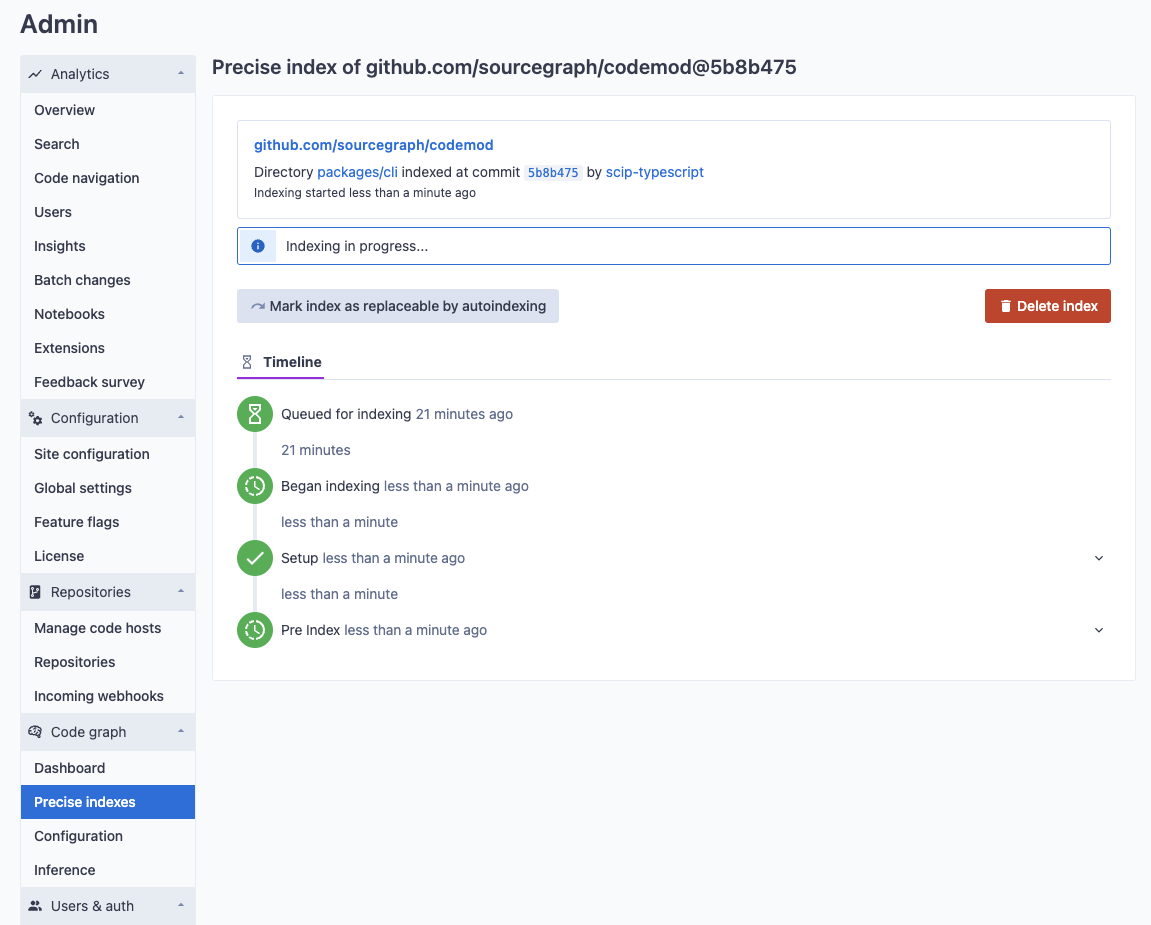
The detail page of an index job will show its current state as well as detailed logs about its execution up to the current point in time.
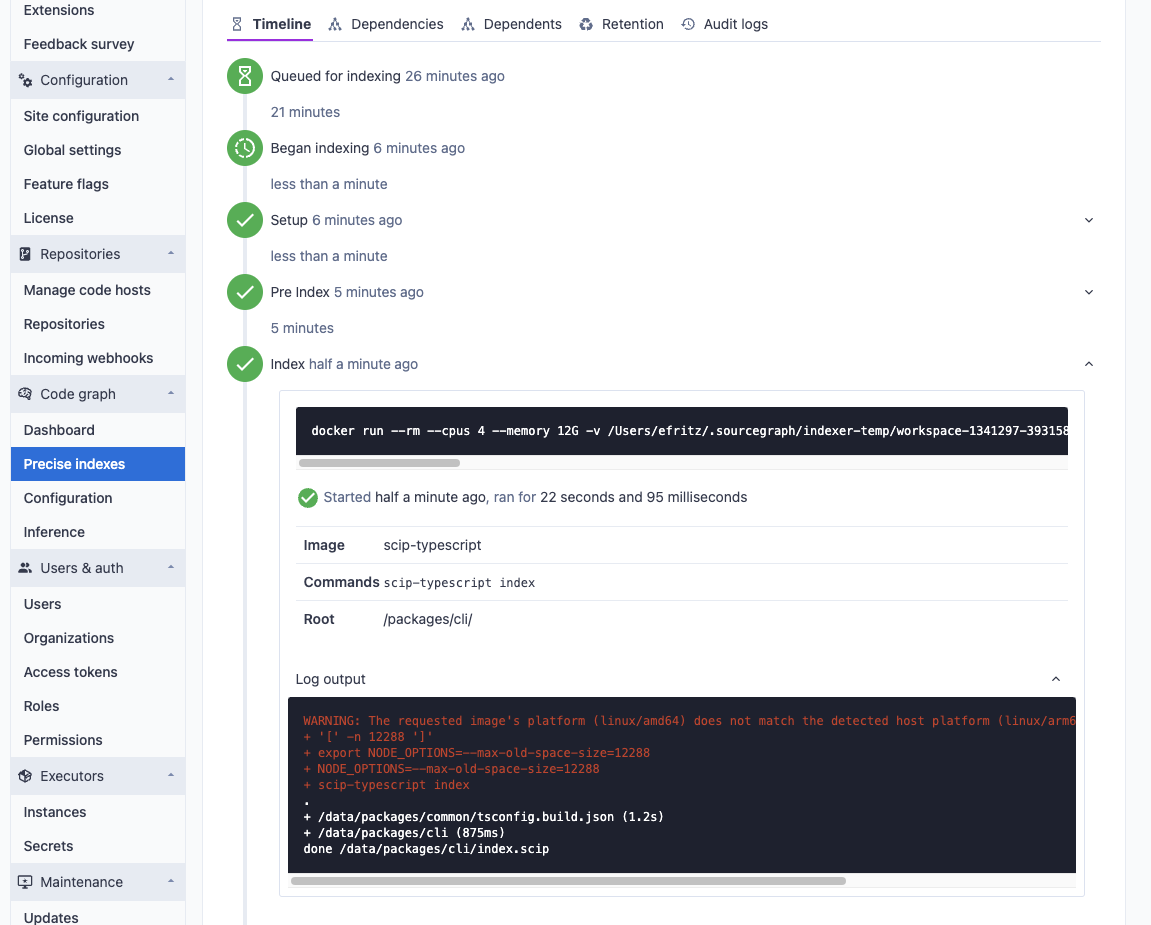
The stdout and stderr of each command run during pre-indexing and indexing steps are viewable as the index job is processed. This information is valuable when troubleshooting a [custom index configuration](/code-navigation/auto-indexing-configuration) for your repository.
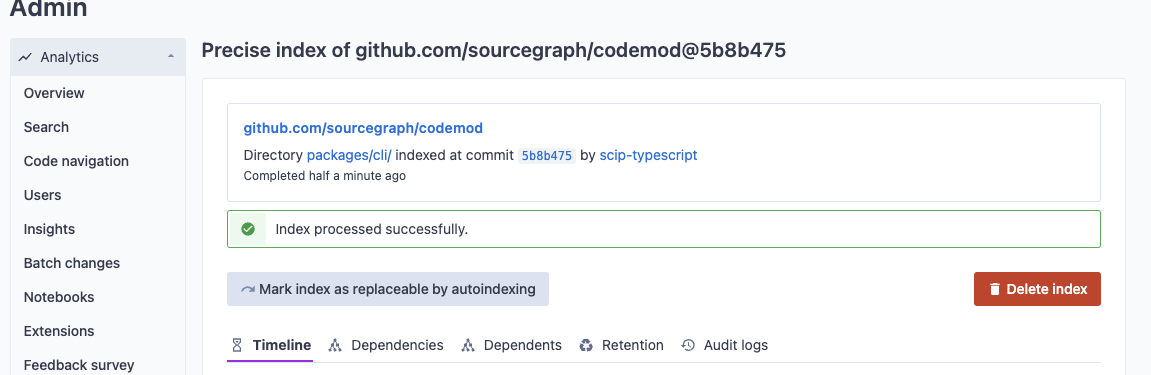
Once the index job completes, a code graph data file has been uploaded to the Sourcegraph instance.
## Inference of auto-indexing jobs
This feature is in beta for self-hosted customers.
When a commit of a repository is selected as a candidate for [auto-indexing](/code-navigation/auto-indexing) but does not have an explicitly supplied index job configuration, index jobs are inferred from the content of the repository at that commit.
The site-config setting `codeIntelAutoIndexing.indexerMap` can be used to update the indexer image that is (globally) used on inferred jobs. For example, `"codeIntelAutoIndexing.indexerMap": {"go": "lsif-go:alternative-tag"}` will cause inferred jobs indexing Go code to use the specified container (with an alternative tag). This can also be useful for specifying alternative Docker registries.
This document describes the heuristics used to determine the set of index jobs to schedule. See [configuration reference](/code-navigation/auto-indexing-configuration) for additional documentation on how index jobs are configured.
As a general rule of thumb, an indexer can be invoked successfully if the source code to index can be compiled successfully. The heuristics below attempt to cover the common cases of dependency resolution, but may not be sufficient if the target code requires additional steps such as code generation, header file linking, or installation of system dependencies to compile from a fresh clone of the repository. For such cases, we recommend using the inferred job as a starting point to [explicitly supply index job configuration](/code-navigation/auto-indexing#explicit-index-job-configuration).
### Go
For each directory containing a `go.mod` file, the following index job is scheduled.
```json
{
"indexing_jobs": [
{
"steps": [
{
"root": "",
"image": "sourcegraph/lsif-go",
"commands": ["go mod download"]
}
],
"root": "",
"indexer": "sourcegraph/lsif-go",
"indexer_args": ["lsif-go", "--no-animation"]
}
]
}
```
For every other directory excluding `vendor/` directories and their children containing one or more `*.go` files, the following index job is scheduled.
```json
{
"root": "",
"indexer": "sourcegraph/lsif-go",
"indexer_args": ["GO111MODULE=off", "lsif-go", "--no-animation"]
}
```
### TypeScript
For each directory excluding `node_modules/` directories and their children containing a `tsconfig.json` file, the following index job is scheduled. Note that there are a dynamic number of pre-indexing steps used to resolve dependencies: for each ancestor directory `ancestor(dir)` containing a `package.json` file, the dependencies are installed via either `yarn` or `npm`. These steps run in order, depth-first.
```json
{
"steps": [
{
"root": "",
"image": "sourcegraph/scip-typescript:autoindex",
"commands": ["yarn"]
},
{
"root": "",
"image": "sourcegraph/scip-typescript:autoindex",
"commands": ["npm install"]
},
"..."
],
"local_steps": [
"N_NODE_MIRROR=https://unofficial-builds.nodejs.org/download/release n --arch x64-musl autol"
],
"root": "",
"indexer": "sourcegraph/scip-typescript:autoindex",
"indexer_args": ["scip-typescript", "index"]
}
```
### Rust
If the repository contains a `Cargo.toml` file, the following index job is scheduled.
```json
{
"root": "",
"indexer": "sourcegraph/lsif-rust",
"indexer_args": ["lsif-rust", "index"],
"outfile": "dump.lsif"
}
```
### Java
Inference for languages supported by
[scip-java](https://github.com/sourcegraph/scip-java) is currently
restricted to Sourcegraph.com.
If the repository contains both a `lsif-java.json` file as well as `*.java`, `*.scala`, or `*.kt` files, the following index job is scheduled.
```json
{
"root": "",
"indexer": "sourcegraph/scip-java",
"indexer_args": ["scip-java", "index", "--build-tool=lsif"],
"outfile": "index.scip"
}
```
## More resources