# Publishing changesets to the code host

<p className="subtitle">Learn how to publish changesets to the code host.</p>

After you've [created a batch change](/batch-changes/create-a-batch-change) with the `published` field set to `false` or omitted in its batch spec, you can see a preview of the changesets (e.g., GitHub pull requests) that will be created on the code host once they're published:
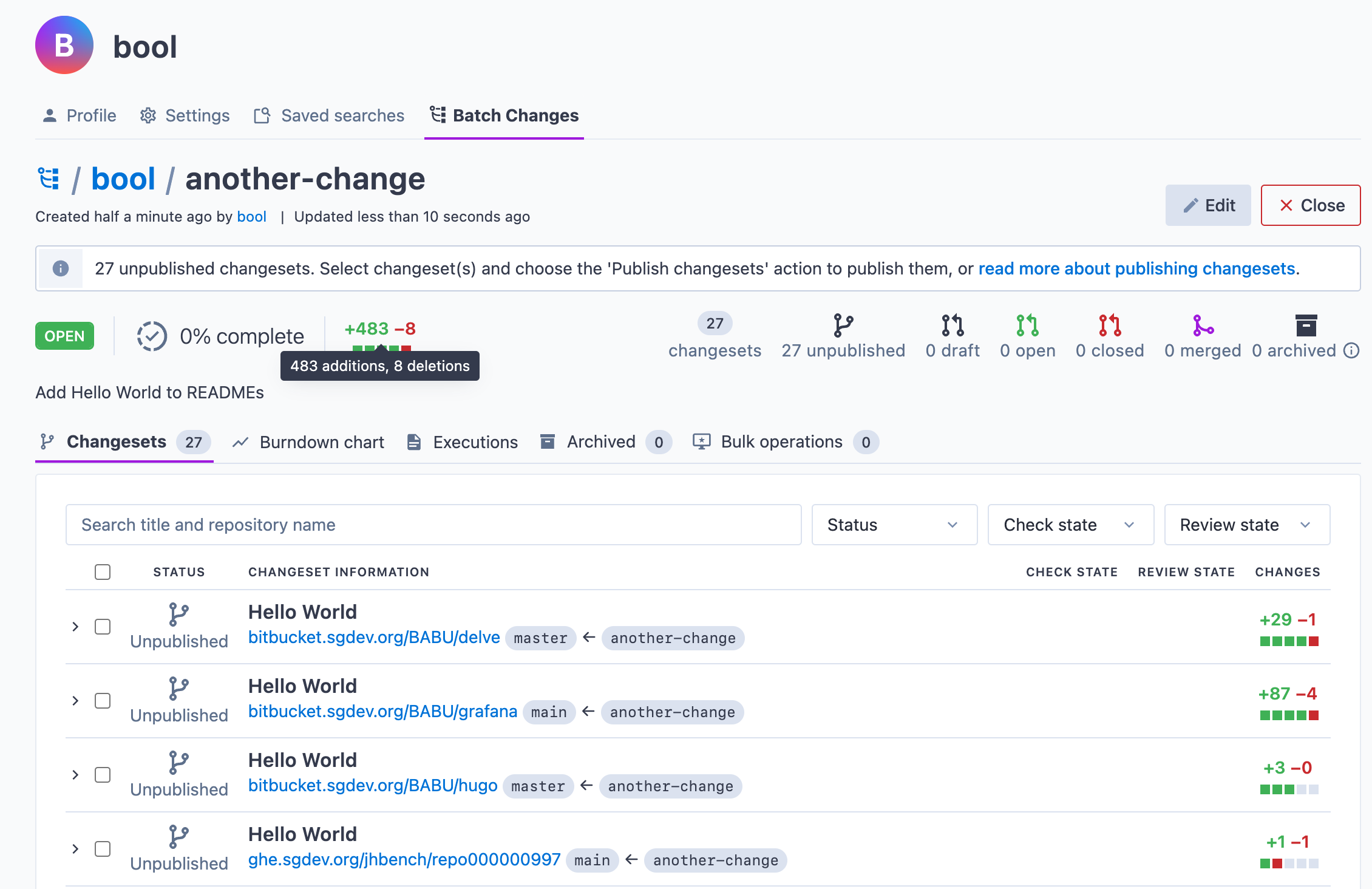
![browser_batch_created](https://sourcegraphstatic.com/docs/images/batch_changes/2024/browser_batch_created.png)

To create these changesets on the code hosts, you need to publish them.

## Requirements

To publish a changeset, you need:

-   [Admin permissions for the batch change](/batch-changes/permissions-in-batch-changes#permission-levels-for-batch-changes)
-   Write access to the changeset's repository (on the code host)
-   A [personal access token](/batch-changes/configuring-credentials#personal-access-tokens) or a [global service account token](/batch-changes/configuring-credentials#global-service-account-tokens) configured for the code host

<Callout type="note">
	For more information, see [Code host interactions in Batch
	Changes](/batch-changes/permissions-in-batch-changes#code-host-interactions-in-batch-changes).
</Callout>

## Publishing changesets

You can publish changesets either by:

-   [Setting the `published` field in the batch spec](#within-the-spec), or
-   [Through the Sourcegraph UI](#within-the-ui)

Each of these options has its pros and cons. Here is a summary:

<table>
	<thead>
		<tr>
			<th>Workflow</th>
			<th>Pros</th>
			<th>Cons</th>
		</tr>
	</thead>
	<tbody>
		<tr>
			<td>
				<div>
					Setting <code>published</code> in the batch spec
				</div>
			</td>
			<td>
				<ul>
					<li>
						If you reuse your batch spec or share it with others,
						the new batch changes will have the same changesets
						published
					</li>
					<li>
						Easy to publish changesets in large batch changes based
						on specific criteria, such as the organization each
						repository is in
					</li>
				</ul>
			</td>
			<td>
				<ul>
					<li>
						Requires the batch spec to be re-applied before changes
						take effect, which can be slower
					</li>
					<li>
						Requires more context switching from the UI back to the
						spec file when previewing diffs
					</li>
				</ul>
			</td>
		</tr>
		<tr>
			<td>
				<div>Publishing from the UI</div>
			</td>
			<td>
				<ul>
					<li>
						Rapid feedback loop: you can check a specific diff and
						immediately publish it
					</li>
					<li>
						Easy to publish random changesets without having to
						specify rules in the <code>published</code> field
					</li>
				</ul>
			</td>
			<td>
				<ul>
					<li>
						Publication state isn't reproducible across multiple
						batch changes
					</li>
				</ul>
			</td>
		</tr>
	</tbody>
</table>

<Callout type="info">
	We currently do not support changing the state of a `published` changeset to
	`draft` or `unpublished`. Once a changeset is published, it can't be
	`unpublished` or changed to a `draft`.
</Callout>

## Within the spec

When you're ready, you can publish all of a batch change's changesets by changing the `published: false` in your batch spec to `true`:

```yaml
name: hello-world

# ...

changesetTemplate:
    # ...
    published: true
```

Then run the `src batch preview` command again or `src batch apply` to publish the changesets immediately. Publishing a changeset will:

-   Create a commit with the changes from the patches for that repository
-   Push a branch using the branch name you defined in the batch spec with [`changesetTemplate.branch`](/batch-changes/batch-spec-yaml-reference#changesettemplatebranch). If [forks are enabled](/admin/config/batch-changes#forks), then the branch will be pushed to a fork of the repository
-   Create a changeset (e.g., GitHub pull request) on the code host for review and merging

<Callout type="note">
	When pushing the branch Sourcegraph will use a **force push**. Make sure
	that the branch names are unused otherwise, previous commits will be
	overwritten.
</Callout>

In the Sourcegraph web UI, you'll see a progress indicator for the changesets that are being published and any possible errors:

![publishing_changesets_viewing_progress_and_errors](https://sourcegraphstatic.com/docs/images/batch_changes/2024/publishing_changesets_viewing_progress_and_errors.png)

If you run into any errors, you can retry publishing after you've resolved the problem by running `src batch apply` again. You don't need to worry about multiple branches or pull requests being created when you retry because the same branch name will be used, and the commit will be overwritten.

### Publishing a subset of changesets

Instead of publishing all changesets at the same time, you can also publish some of a batch change's changesets by specifying which changesets you want to publish in the `published` field:

```yaml
# ...

changesetTemplate:
    # ...
    published:
        - github.com/sourcegraph/src-cli: true
        - github.com/sourcegraph/*: true
        - github.com/sourcegraph-private/*: false
```

<Callout type="info">
	See
	[`changesetTemplate.published`](/batch-changes/batch-spec-yaml-reference#changesettemplatepublished)
	in the batch spec reference for more details.
</Callout>

### Publishing changesets as drafts

Some code hosts (GitHub, GitLab) allow publishing changesets as **drafts**. To publish a changeset as a draft, use the `'draft`' value in the `published` field:

```yaml
# ...

changesetTemplate:
    # ...
    published: draft
```

<Callout type="info">
	See
	[`changesetTemplate.published`](/batch-changes/batch-spec-yaml-reference#changesettemplatepublished)
	in the batch spec reference for more details.
</Callout>

### Fully publishing draft changesets

If you have previously published changesets as drafts on code hosts by setting `published` to `draft`, you then fully publish them and take them out of draft mode by updating the `published` to `true`.

<Callout type="info">
	See
	[`changesetTemplate.published`](/batch-changes/batch-spec-yaml-reference#changesettemplatepublished)
	in the batch spec reference for more details.
</Callout>

## Within the UI

<Callout type="info">
	{' '}
	This feature is supported in Sourcegraph versions 3.30 or more.
</Callout>

To publish from the Sourcegraph UI, you'll need to remove (or omit) the `published` field from your batch spec. When you apply a batch change without an explicit `published` field, all changesets are left unpublished.

### From the preview

<Callout type="info">
	{' '}
	This feature is supported in Sourcegraph versions 3.31 or more.
</Callout>

When you run `src batch preview` against your batch spec and open the preview link, you'll see the current status of each of your changesets, as well as a preview of the actions that will be performed when you apply:

![publish_ui_browser_preview](https://sourcegraphstatic.com/docs/images/batch_changes/publish_ui_browser_preview.png)

For any changesets that are currently unpublished or only published as drafts, you can select the checkbox and choose an action from the dropdown menu to indicate what publication state you want to set the changesets to apply on:

![publish_ui_browser_select_action_on_apply](https://sourcegraphstatic.com/docs/images/batch_changes/publish_ui_browser_select_action_on_apply.png)

<Callout type="note">
	Certain types of changeset cannot be published from the UI and will have
	their checkbox disabled. Not sure why your changeset is disabled? Check the
	[FAQ](/batch-changes/faq#why-is-the-checkbox-on-my-changeset-disabled-when-previewing-a-batch-change).
</Callout>

Once the preview actions look good, click **Apply** to publish the changesets. You should see an alert appear indicating that the publication states actions have been updated, and the changesets' "Actions" will reflect the new publication states:

![publish_ui_browser_preview_update](https://sourcegraphstatic.com/docs/images/batch_changes/publish_ui_browser_preview_update.png)

### From an open batch change

Once applied, you can select the changesets you want to publish from the batch change page and publish them using the [publish bulk operation](/batch-changes/bulk-operations-on-changesets), as demonstrated in this video:

<video
	width="1920"
	height="1080"
	loop
	playsInline
	controls
	style={{width: '100%', height: 'auto'}}
>
	<source
		src="https://sourcegraphstatic.com/docs/videos/batch_changes/publish-ui-docs.mp4"
		type="video/mp4"
	/>
</video>

## Specifying Git commit details

Regardless of how you publish your changesets, the commit created and pushed to the branch uses the details specified in the batch spec's `changesetTemplate` field.

<Callout type="info">
	See
	[`changesetTemplate.commit`](/batch-changes/batch-spec-yaml-reference#changesettemplatecommit)
	for details on how to set the author and the commit message.
</Callout>
